Messages, turned into your schedule.
Send Origami a message, email or screenshot. It captures what’s happening, when, where and what you need to remember.

7 days free, then $6.99 a month.

 WhatsApp · Priya
 Email · Oakfield Elementary
The details are already in the message.
Origami captures the time, place and instructions from what you send, so you don’t have to enter them again.



Send only what you want Origami to capture.
Just send it to Origami.
Origami turns what you send into events, reminders and tasks, with the date, place and instructions already captured.
Send it as it is.

A message, email, PDF, photo or voice note.
The details, captured.
Details you won’t have to repeat.

The doctor and address you shared before.
When something changes,
send the update.
“Tuesday’s swim moves to 5:15. Same pool.”
Whatever you forward, Origami finds the details.
Send a voice note to update the dentist appointment.
Voice note0:07 “Oh and Maya’sWho dentistWhat moved to Thursday at three fortyWhen, it’s at Dr Okafor’s officeWhere now.”
Saved in Origami
Dentist, Dr Okafor · Maya Thu, Jun 183:40 PMDr Okafor's officeMoved from Tuesday
Send a photo of the invitation. Origami captures the time and place.
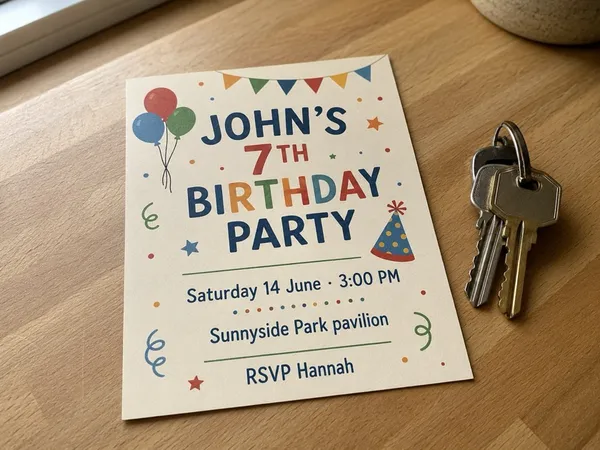
John’sWho 7th birthday partyWhat, Saturday, June 14, 3:00 PMWhen, Sunnyside Park pavilionWhere.
Saved in Origami
John's birthday party Sat, Jun 143:00 PMSunnyside Park pavilionOriginal invitation attached
Forward the season schedule to capture the events inside.
 School PDF
 Ironworks Youth Soccer · Season schedule.pdfpage 2 of 4
…confirming that your league gameWhat against the KestrelsWho will be played on Friday, June 26When at 7:00 PMWhen on field 3Where. Please arrive fifteen minutes early; the away team wears the darker jerseys…
Saved in Origami
Soccer vs the Kestrels Fri, Jun 267:00 PMIronworks, field 3Arrive 15 minutes early.

Ready for your day.
Your events, reminders and tasks are together in Origami. Send a change when it arrives, and Origami updates your schedule with the latest details.

Start with your next message.
Good to know.
What can I send to Origami?
Send a WhatsApp message, forward an email, or share a PDF, photo or screenshot. You can also record a voice note in Origami. It captures events, reminders and tasks from what you send.
Does everyone in the conversation need Origami?
No. You send the message to your own Origami account. The people who sent it do not need to sign up.
Where do I find what’s been captured?
Open Origami to see your events, reminders and tasks. Each entry keeps the original message or file attached.
What happens when the time changes?
Send the new message. Origami updates the existing event and asks if it cannot tell which one you mean.
How does it remember the details?
It remembers useful details you’ve shared, such as your dentist’s name and address, so you don’t have to repeat them next time. You can view and edit those details in the app.
What if a detail is wrong or missing?
Origami uses AI and can get a detail wrong. It asks when an important detail is unclear. Each saved entry keeps its source, and you can edit or delete it.
Is my data private?
You choose which messages and files to send. Origami does not read your inbox or other conversations in the background. The Privacy Policy explains what is stored, which providers process it, and how to delete your account and data. Read the full Privacy Policy
What does it cost, and can I cancel?
7 days free, then $6.99 a month. Your subscription renews monthly. Cancel in your Apple account settings at least 24 hours before the trial ends to avoid the first charge.
What currency is the price in?
Prices on this site are in US dollars. The App Store shows your local price before you subscribe.
How do I get started?
Download Origami and follow the setup steps. Then send your first email, photo or PDF. To forward from WhatsApp, connect your number in Settings.